Transaction Settings
Transaction settings enable you to log various transactions occurring within AppForms. These logs should be activated only when there is a need to track transaction history for monitoring or troubleshooting web service issues. If the web service transmits sensitive data, it is recommended to keep logging disabled to maintain data security.
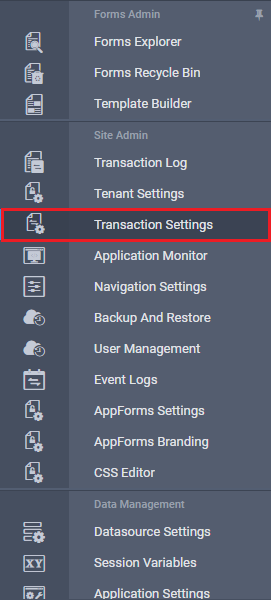
Click the Transaction Settings link in the left navigation panel, as shown in the image below.
The Transaction Settings page will appear as shown in the image below.
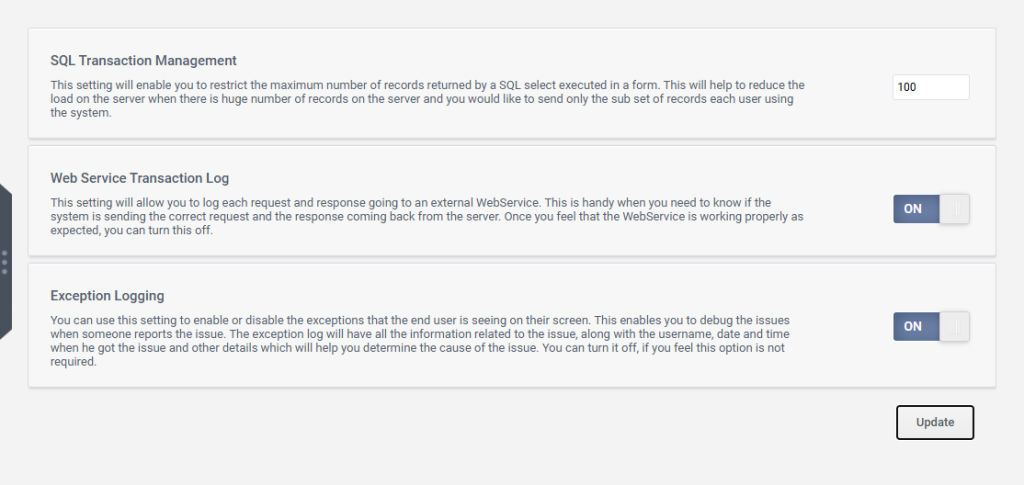
Transaction settings offer three options. Let’s explore each of them in detail:
- SQL Transaction Management:
This setting allows you to limit the maximum number of records returned by an SQL select query executed within a form. It helps reduce server load when dealing with large volumes of data by ensuring that only a subset of records is sent to each user. Enter the desired number of records to retrieve in the provided textbox and click the Update button. This will ensure that only the specified number of records are fetched when the SQL select query is executed.
- Webservice Transaction Log:
This setting enables logging of every request and response sent to an external web service. It’s useful for verifying that the system is sending the correct requests and receiving the expected responses from the server. Once you’re confident the web service is functioning correctly, you can disable this logging.
- Exception Logging:
This setting allows you to enable or disable the display of exceptions that end users see on their screens. The exception log captures detailed information about each issue, including the username, date and time, and other relevant details to help identify the cause. You can disable this option if you find it unnecessary.