FAQs – RPA Genie BOT Manager

RPA Genie Bot Manager is a web application that connects multiple bots and can manage each of the bots connected to it. Using this component, you can connect multiple bots to the bot manager, add, schedule, monitor the automation, and control automated bots and processes.

Q: What is RPA Genie? what does it do? Explain RPA Genie BOT Manager.

A: RPA Genie is an automation platform developed by ClaySys. The core purpose of RPA Genie is to automate tasks and business processes.

RPA genie Bot Manager is built on AppForms that enables you to manage your Robots in executing business processes.

Q: What are key features of RPA Genie BOT Manager?

A: The key features of RPA Genie are as follows:

  • Deployment: RPA Genie Bot Manager can help you deploy your bots to a variety of environments.
  • Monitoring: RPA Genie Bot Manager provides real-time monitoring of your bots, so you can quickly identify and troubleshoot any problems.
  • Troubleshooting: RPA Genie Bot Manager provides a variety of tools to help you troubleshoot your bots, including audit logs, status, timestamp, etc.
  • Security: RPA Genie Bot Manager provides security features to protect your bots and data.

Q: Is RPA Genie Server a Windows service? Can it be run as an AD user account of our choosing?

A: RPA Genie Server is a service that is hosted on the IIS. Hence, you will be able to run as any AD user.

Q: RPA Genie BOT Manager – how often do the bots/agents report back into the Genie Bot Manager? And, what does that traffic overhead look like?

A: The traffic overhead will be based on the number of automation and the type of automation that is configured. BOTs perform the logging to the BOT Manager based on the actions performed by the BOTS. Each action is recorded to the BOT service.

Q: Since this is a web-based application, do you only utilize IIS or is there a lot of other software that complements the IIS web service (like a full-blown application install)?

A: We only use IIS.

Q: If we delete a process, is there a possibility of losing the statistical data that we were tracking such as time saved, number of transactions, etc.?

A: It will not affect statistical data.

Q: Is it possible for us to rename the Robot Name in BMT which wouldn’t affect the actual machine name or AD user name. We are aware that its possible in the Robot details part but would it affect the process in any way?

A: It’s possible to change the robot name on the Robot edit page of Bot Manager. And it won’t affect the actual machine name or AD user name. (Make Sure we have the latest stable Appforms Extension Installed).

Q: Can we restrict a BMT user to use only one bot machine?

A: Currently, We don’t have support to limit the users to use only one bot machine.

FAQs – RPA Genie Studio

RPA Genie Studio is a visual designer used to create a robotic process automation. Using this component, you can design a process automation, run the automation and deploy it to local system or to the Bot Manager.

Q: What is RPA Genie? what does it do? Explain RPA Genie Studio.

A: RPA Genie is an automation platform developed by ClaySys. The core purpose of RPA Genie is automating tasks and business processes. RPA Genie studio is a development platform which is used to create or configure the automation process on Windows applications or web applications.

Q: what are key features of RPA Genie Studio?

A: The key features of RPA Genie Studio are as follows:

  • Drag-and-drop automation builder: RPA Genie Studio makes it easy to create automation workflows by using a drag-and-drop interface.
  • OOTB activities: RPA Genie Studio comes with a library of pre-built activities that can be used to automate common tasks.
  • Debugging tools: RPA Genie Studio has built-in debugging tools that can help you troubleshoot your automation workflows.
  • Exception handling: RPA Genie Studio can handle exceptions that occur during automation execution.
  • Logging: RPA Genie Studio logs all automation activities, which can be used to track the performance of your automation workflows.
  • Collaboration: RPA Genie Studio supports collaboration, so multiple users can work on the same automation project.

Q: What are the key considerations to select a process for automation using RPA Genie studio?

A: The key considerations to select a process for automation are as follows:

  • creating decision-based or rules-based workflows
  • automating large and repetitive tasks without any human intervention
  • extracting data from various sources
  • process should involve a lot of data entry.
  • preparing automated reports and sharing those via scheduled email.
  • process should be time-consuming or error-prone.

Q: Can RPA Genie automate tasks on web applications and desktop applications?

A: Yes, RPA Genie can automate tasks on both, web applications as well as on the desktop applications. It can interact with various web browsers and desktop software to perform a wide range of automated tasks.

Q: Do I need programming skills to use RPA Genie?

A: No, users may wonder if they need prior coding knowledge and which all programming languages are relevant to RPA Genie. But RPA Genie is simple tool that has drag and drop commands. Only basic logical understanding is needed to create automation processes by drag-and-drop of activities that are available in RPA Genie Studio.

Q: Which all web browser’s are supported by RPA Genie to create web automation?

A: Web browser’s supported by RPA Genie are Google Chrome, Internet Explorer, Microsoft Edge and Mozilla Firefox.

Q: Is RPA Genie cloud based platform?

A: No, installation of packages is required in your local system.

Q: How do I create my first automation workflow?

A: Automation workflow can be created using RPA Genie Studio. Based on your automation requirement, you can drag-and-drop the available activities from the studio. In case, certain activity is not available in the studio, you may install and use custom activities called as NuGet packages.

Refer genie studio activities  For learning, you may refer the link to get started with RPA Genie Automation project using studio : https://www.claysys.com/rpa-genie/documentation/rpa-genie-studio/getting-started/

Also, refer the RPA Genie Studio activity packages : https://www.claysys.com/rpa-genie/documentation/rpa-genie-studio/introduction-to-genie-activities/

Q: Is RPA Genie free or is there a cost involved?

A: As of now, RPA Genie is not public. It comes in an installer file. It is not free, please contact sales team for pricing details.

Q: Deploying RPA Genie Studio to the local system or Bot Manager – Does that mean the computer or the server?

A: The automation created using RPA Genie can be deployed to a standalone BOT Machine (specification can be found in the architecture diagram). This can also be deployed to a BOT Manager, the central hub for BOTs (this will be a server). Once it is deployed to the BOT Manager all BOTs connected to the BOT Manager will have access to the automation (unless it has been restricted by applying for security permission).

Q: What software dependencies does it need for debugging?

A: Everything comes OOTB. You do not need any dependency to be installed or configured.

Q: Where do the logs go – To the SQL database? to the local server or to the local desktop system?

A: All the logs go to the SQL database.

Q: Does it strip any PII data that may be in the logs if the RPA process is looking at PII data for its analysis? For example, if it is analyzing an Excel sheet with PII data.

A: RPA Genie does not log any data. Only the actions/activities are logged. You can still log the data using custom logs and you can avoid logging any PII information.

Q: Explain Check In/Check In All/Check Out/Publish concepts When working on a project in RPA Genie Studio. Also, if a user is allowed to work on the project and later have another person to work on it then, what is the way in which the user needs to move out of a project so that another user can further work on it?

A: Once a project is checked-in, we can right click on the project and select the publish option. This published project will be available in the Bot Manager as a package. Next, this package needs to be added as a process and the required version needs to be selected to run the process as a job through the Bot Manager. Once a user has created, developed and finished working with a process, he needs to check-in that particular process so that another user will have the option to check-out that process in-order to work on the same.
If any other user needs to check out the process, he must go to Project Explorer, right-click on the process that was checked in and select the checkout option. After making the necessary changes he has to check in the process again. The first user need to check in the Project, so that another user will be able to check-out that project to edit the Properties and NuGet Packages of the project.

  • To check-in a process, go to project explorer, right click on the required process. Select the check-in option from the menu in-order to check- in that particular process.
  • If we right click on the project, we can select the check in option to check-in the particular project to save the Properties and NuGet Packages for that project
  • The check-in all option is used to check-in all the processes that come under the project.

In each of these cases, we need to add a comment and click on the Commit Button to save the changes.

Q: Can we have separate folder for screenshots of each process?
A: We can achieve this using a workaround. We can disable the default error screenshot in On Error Activity and we can Capture the screen and save it in the desired location for each process as per our requirement at the process level.
FAQs – RPA Genie Agent

RPA Genie Agent is a host that executes the automation that we have created using the RPA Genie Studio. The agent can either run as a standalone bot or with multiple bots connected to the Bot Manager. The RPA Genie agent will be able to login to the Bot machine with a user account, and then perform the automation when it is triggered.

Q: What is RPA Genie? what does it do? Explain RPA Genie Agent.

A: RPA Genie is an automation platform developed by ClaySys. The core purpose of RPA Genie is to automate tasks and business processes.

RPA Genie Agent is a bridge between RPA Genie Studio and BOT Manager in which you are able to manage processes, and register and connect robots to the BOT Manager.

Q: What are the key features of RPA Genie Agent?

A: The key features of RPA Genie are as follows:

  • Easy to install and configure: RPA Genie Agent is easy to install and configure, and it does not require any special permissions.
  • Robust: RPA Genie Agent is designed to handle even the most complex automation scenarios.
  • Scalable: RPA Genie Agent can be scaled to support a large number of bots.

Q: Wouldn’t we likely run our enterprise-level implementation with a Bot Manager and not as a standalone bot?

A: Yes, for any enterprise-level setup we would have a BOT manager. This would help in tracking, analyzing, and verifying the automation and also help us manage the BOTs and the automation efficiently.

Q: Anytime you install the RPA Genie Studio on a computer, do you need to install the Genie Agent as well?

A: Anytime you install RPA Genie Studio, the Genie Agent will get automatically installed.

Q: What is the licensing model followed? Is it per Agent?

A: The licensing model is site licensing. With this model, you will be able to set up any number of Attended or Unattended bots across all the environments.

Q: Would you need the Agent running on any Server Desktop or system it touches?

A: The BOTs need to be installed only on the BOT machines (desktop where we perform automation). All the applications that the BOT needs to interact with need to be installed in the BOT machine and credentials should be provided to login to the corresponding applications (web/windows).

Q: If the need was to look at an Excel file on a File Server and recursively go through it to look for any amount that is over $10,000 and export those rows to another Excel file on that File server, would an Agent need to be installed on the File server as well or just the RPA Genie Application server?

A: For this case we will need to set up a BOT machine (desktop/server) that has access to these files/folders. The RPA Agent need not be installed in the File server. Consider each BOT machine as your digital assistant/employee. These resources will have their own workstation to perform the actions for the automation. Each of these resources will be able to perform any tasks/automation if it has all the applications needed for the automation installed and configured in the BOT Machine/Workstation.

FAQs

Below listed are some of the Frequently Asked Questions (FAQs) by the RPA Genie users for your reference:

Release Notes v.7.x.x

The Build 7 of RPA Genie has been released on 16 February 2023. This release notes lists out all the additional features, fixes and improvements that have been made to RPA Genie when compared to Build 6.x.x. The first version of RPA Genie is 7.1.3.0 and the final version is 7.3.0.0. Below you will find the comprehensive details about the features and updates for different versions of Build 7. Our relentless efforts are directed at enhancing its capabilities to deliver the best possible automation experience, exceeding expectations and enabling our users to reach new levels of productivity and efficiency.

RPA Genie Release Update (Version 7.1.3.0)

Release date: 16 February 2023

Features

  • Source Control Enhancements allow users to collaborate between multiple Users with default Genie GIT Integration while developing large projects.
    1. Project Version Comparison is the editor tab that shows the overall changes of the current version with the old version.
    2. History Tab list all the available version of the selected module.
    3. Modules Comparison is the editor tab that shows the difference between the selected two versions.
    4. GIT Operations supported are Check-In, Check-Out, Commit, and Undo-Checkout.
    5. Project Undo Checkout will revert to the previous checked-in state.
  • Global History: tab allows the user to view all the CURD operations in the BMT.
  • Environment Import & Export: helps to migrate the automation data from one to another.(This feature Is released as a beta version)
  • Maintenance Mode that helps the administrator in large-scale deployment and server maintenance such as undertaking upgradation by stopping the automation process and active triggers by two modes.
    1. Server Maintenance:  provides a solution to stop all related activities and applies to all the connected robots.
    2. Machine Maintenance: provides a solution to stop all related activities on the maintenance machine only.
  • Diagnostic Tools
    1. Server Diagnostic helps the admin users to figure out the issue and suggest the required solution more precisely.
    2. Robot Diagnostic allows the users to fetch all necessary details required for a job failure analysis as a ZIP file.
  • Service Enhancements
    1. Database Redundancy: based on the time interval provided in the bot manager setting the old values are truncated from the database.
    2. Auto Update: this option is present in the machine edit of BMT settings which disables the auto-update for the same machine.
  • Runtime Enhancements
    1. Extension Manager: this is available in an agent’s context menu, allowing the user to install the plugins.
  • Log Redundancy: Agent service will automatically clear the below path:
    • %appdata%\RPA.Genie\_screenshot
    • %appdata%\RPA.Genie\logs
    • %programdata%\RPA.Genie\logs
    • %programdata%\RPA.Genie\Agentservice\logs\rdp
  • Studio Enhancements
    1. BG process to UI Process: this feature allows the users to convert a background process into a User Interaction process.
    2. Watch panel: this panel is visible during debugging and it can be set to display the values of arguments and variables. Those values are updated dynamically after each activity execution.
    3. Recycle Bin: this is available in the dashboard of the studio, which helps us retrieve the deleted projects in the studio.
    4. Axes Based Selector is the set of selectors that search for a UI element using other UI elements. This can be used if the user can’t find the exact element selector.
    5. Advanced Search: this allows to search based on the property value.
    6. Pin Tabs: It docks the target tab in the designer panel until the user unpins the tab.
    7. Pin Project: It docks the target project at top of the project list.
    8. Drag & Drop Support: it supports the sequence and process to the canvas.
    9. Copy selector: A context menu has been added in UI elements to get a selector copy to the clipboard.
  • Trigger Failure Monitoring: allows the trigger to get auto-disabled if the triggered jobs are throwing the same error for the configured count in the time trigger section.
  • Auto Process Update: allows to update of the process version automatically when the new version is published from the studio.
  • Alert Advancements
    1. Job not started: It will throw the alert mail if the job is not started in the scheduled robot in a given time.
    2. Trigger Disabled: if the configured trigger is auto-disabled by job failure monitoring, we will be receiving mail for the same.

New RPA Genie Activities

  1. Switch Tab – allow us to change the tab with both tab title and index. (This feature Is released as a beta version)
  2. Add Resource – It adds the new resource to the BMT with the robot.
  3. Update Resource – It updates the existing resource to the BMT with the robot.
  4. Get Multiple Resources – It gets the multiple resources of the BMT with the robot.
  5. Delete Resource – It deletes the existing resource to the BMT with the robot.
  6. Get Job Details-that returns the current job details in the object variable.
  7. Get Robot Details – that return the current robot details in the object variable.
  8. Format Date Time – allow us to convert date time into any available format.
  9. Rename File – it renames the existing file name with the given name.
  10. Rename Folder – It renames the existing folder name with the given name.
  11. Terminate Job – It force-stops the currently running job when this activity is executed.
  12. Assert True/False – allow the evaluation of the expression and throw a defined error if the value is false.
  13. Get Holiday Calendar – It returns the list of holidays based on the given calendar name.
  14. Close Browser – It kills all the cache and cookies of the browser that is indented to close.
  15. Delete Queue Item – It removes the queue item from the queue based on the given transaction item.
  16. Stop Job –This will stop the job which is already running by passing the required parameters.
  17. Beep Sound – it plays a notification sound when the activity is executed.
  18. Get Folder Info – it returns the detailed information of the folder in the variable.
  19. Delete Row – it removes the existing row of the given input data table.
  20. Delete Column – it removes the existing column of the given input data table.
  21. Join Data Table – Allows the user to combine Rows from two data tables by using values common to each other, according to a Join rule.

Bot Manager Enhancements

  1. NuGet Download allows the user to download the existing NuGet package with available versions.
  2. API Timeout Popup throws a popup when the access token is expired.
  3. Start Job with Arguments will allow the user to manually enter the argument value which will reflect in the processes.
  4. Stop Multiple Jobs this is available in the job tab, which helps to stop all the running and scheduled jobs.
  5. Job Filter added the start date and end date in the filter section.
  6. Delete options in Queue, Process, and Holiday Calendar are added.
  7. Get Robot Logs allows the user to pull the logs from the robot machine with the help of BMT.
  8. Nested Transaction Refresh Button and Transaction Count are added in the transaction tab of the job details page.
  9. Expiry Time in Queue Trigger is implemented.
  10. Expiry Time in Single Time Trigger is implemented.
  11. Advanced Pagination in all the table views available in Bot Manager.
  12. Migration from Combo box to auto-complete box to extend the limitation of the combo box.
  13. BMT enhancement Form validation is implemented in all available forms.

NuGet Packages

  1. RPA.Genie.JavaPlugin
  2. RPA.Genie.Password.Generator
  3. RPA.Genie.Network.Activities
  4. RPA.Genie.CommandPromt.Activity
  5. RPA.Genie.Outlook.Extension
  6. RPA.Genie.ProcessTray.Activity
  7. RPA.Genie.Image.Extension

Top Fixes and Improvements

  • Fixed: Job Cancelled: The mail template for this alert is updated.
  • Fixed: Added mandatory field while adding the queue.
  • Fixed: RPA.Genie.Datatable.Extension validation added.
  • Fixed: “Variable/Argument not defined” bug fixed for “multiple assign” activity.
  • Fixed: Activities were not saving in finally / on error when the process was checked in issue is fixed.
  • Fixed: Unpublished and Deleted processes that were visible in the job filter are fixed.
  • Improvements: Index property added in the loop and for each activity.
  • Improvements: delay between the keys in send keys activity.
  • Improvements: Support screen percentage for elements bounds for elements activity.
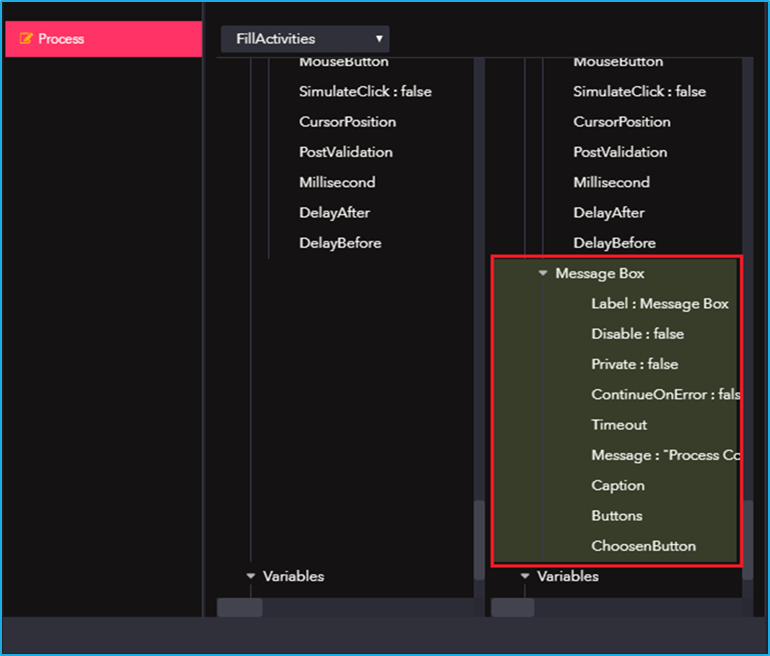
  • Improvements: Advance Message box activity with the caption, button type, and timeout.
  • Improvements: Disconnect Agent and Auto stop the job if the remote session disconnected.
  • Improvements: BMT Validation for all the tabs.
  • Improvements: Added expression property in decision switch.
  • Improvements: Added recursively, delete source folder option in delete file activity.
  • Improvements: Connection string builder for database-related activities.
  • Improvements: RPA.Genie.ExcelMacro.Activities added input parameters to execute the macro
  • Improvements: RPA.Genie.FTP.Activities added a search pattern for selecting files.
  • Improvements: RPA.Genie.PDF.Activity added a new pdf engine for rendering.
  • Improvements: RPA.Genie.WebRequest.Activity added authentication (Bearer, Basic, NTML).
  • Improvements: Agent service startup settings updated to automatic delayed restart.

Deprecated Modules

  • Deprecated: Job Status Change Mail Notification in Mail Alerts.
  • Deprecated: Process update history on every process.
  • Deprecated: Force-checking modules in source control.

RPA Genie Release Update (Version 7.1.4.0)

Release date: 20 February 2023

Top Fixes and Improvements

  • Improvement: Changing the log level by default to a warning in the RPA Genie service.

RPA Genie Release Update (Version 7.1.5.0)

Release date: 10 March 2023

Top Fixes and Improvements

  • Fixed: IE mode session issue with the Edge browser is fixed.
  • Improvement: Added option to enable the browser driver logging in to browser activities inside RPA Genie Studio.

RPA Genie Release Update (Version 7.1.6.0)

Release date: 14 March 2023

Top Fixes and Improvements

  • Fixed: The agent service crash issue when the Remote desktop session was connected is fixed.
  • Fixed: The user logout event was not captured in the machine audit in BMT is fixed.

RPA Genie Release Update (Version 7.1.7.0)

Release date: 16 March 2023

Top Fixes and Improvements

  • Fixed: The issue with create sequence option while creating a sequence is fixed.
  • Fixed: The user’s Web browser was not listed in the UI explorer based on the AutomationSettings.json file is fixed
  • Fixed: Activity timeout was affecting the transaction connection time out of the already configured projects in the previous builds is fixed.

RPA Genie Release Update (Version 7.1.8.0)

Release date: 24 March 2023

Top Fixes and Improvements

  • Fixed: The trigger Migration Script is fixed.

RPA Genie Release Update (Version 7.1.9.0)

Release date: 29 March 2023

Top Fixes and Improvements

  • Fixed: Path Exist activity validation is fixed.
  • Fixed: Alert filter option in BMT is fixed.
  • Fixed: In the robot alert page validation for the disconnect time interval is fixed.
  • Fixed: Tenant Filter in BMT is fixed.

RPA Genie Release Update (Version 7.1.10.1)

Release date: 04 April 2023

Top Fixes and Improvements

  • Fixed: Microsoft Edge browser automation issue when two tabs were opened is fixed.
  • Fixed: Inspect Element Is taking more time than expected in the Microsoft Edge browser is fixed.

RPA Genie Release Update (Version 7.1.11.0)

Release date: 06 April 2023

Top Fixes and Improvements

  • Fixed: The holiday calendar set for Queue Scheduler/Trigger in BMT was getting executed on already set Holidays is fixed.
  • Fixed: The arguments which already configured were not listed in Invoke process activity are fixed.
  • Fixed: Global search in the left panel of the RPA Genie Studio was getting stuck for bigger projects is fixed.

RPA Genie Release Update (Version 7.1.12.0)

Release date: 19 April 2023

Top Fixes and Improvements

  • Fixed: Robot Busy was not capturing in Robot audit details if two jobs were scheduled is fixed
  • Fixed: RPA.Genie.Service crashes while concurrently accessing the client collection are fixed.

RPA Genie Release Update (Version 7.2.1.4)

Release date: 11 May 2023

Top Fixes and Improvements

  • Fixed: Redis cache – Concurrent access in client collections has been fixed.
  • Fixed: “Scheduled by” Information was not present for the trigger-based process is fixed.
  • Fixed: “Expiry time” issue in Queue Scheduler is fixed.

New Feature

  • New property “Timeout” has been added to open Browser activity.

RPA Genie Release Update (Version 7.2.2.0)

Release date: 12 August 2023

Top Fixes and Improvements

  • Fixed: SQL Script for the Data Redundancy is updated.
  • Fixed: Unicode issue is fixed. This fix will be compatible with SQL server 2019 or above.

RPA Genie Release Update (Version 7.2.3.0)

Release date: 14 August 2023

Top Fixes and Improvements

  • Fixed: “Robot busy – audit” was not getting captured in Robot Audit details when two UI processes run Simultaneously is fixed.

RPA Genie Release Update (Version 7.2.4.0)

Release date: 21 August 2023

Top Fixes and Improvements

  • Fixed: Chrome version greater than 115 series compatibility issue is improved.
  • Revoked: Fix for the Unicode issue in 7.2.2.0 version is revoked due to latest SQL server
    dependency.

RPA Genie Release Update (Version 7.3.0.0)

Release date: 20 September 2023

Top Fixes and Improvements

  • Fixed: Open browser enables the accessibility by default to get the selectors from chrome and
    the Edge browsers.
  • Improvements: Bypassed the Reboot Prompt message and auto close command prompt in
    silent installation.
  • Improvements: Open browser activity preference validation is improved.

RPA Genie Release Update (Version 7.3.1.0)

Release date: 20 October 2023

Top Fixes and Improvements

  • Fixed: Issue with client-side token creator is fixed.
  • Fixed: Auto download driver option in MS Edge and Firefox browser is fixed.
  • Fixed: Queue trigger not working while build upgrade is fixed. Migration script is updated.

RPA Genie Release Update (Version 7.3.3.0)

Release date: 04 December 2023

Top Fixes and Improvements

  • Fixed: Validations in Nuget activities is roll-backed.

RPA Genie Release Update (Version 7.3.4.0)

Release date: 28 February 2024

Top Fixes and Improvements

  • Fixed: The Chrome Driver Storage path has been modified by the Chrome team. The working of the Auto download feature is improved.
  • Fixed: Instead of getting cancel job going to error state after the expire time in the Time and Queue scheduler.
  • Fixed: Server Certificate-Based Token Signing for Load Balanced Servers.
  • Fixed: In the trigger history other trigger details getting updated.

Release Notes v.6.x.x

The Build 6 of RPA Genie has been released on 24 January 2022. This release notes lists out all the additional features, fixes and improvements that have been made to RPA Genie when compared to Build 5.x.x. The first version of RPA Genie is 6.3.0.1 and the final version is 6.8.1. Below you will find the comprehensive details about the features and updates for different versions of Build 6. Our relentless efforts are directed at enhancing its capabilities to deliver the best possible automation experience, exceeding expectations and enabling our users to reach new levels of productivity and efficiency.

RPA Genie Release Updates (Version 6.3.0.1)

Release date: 24 January 2022

Features

  • Alert Feature in BMT enables the user to get alerts on item changes in Job, Queue, Robot, and Machine. You can get an email alert whenever the state of the job, Queue, Robot, and Machine changes.
  • Request Stop provides an option for the smooth termination of a job based on the user configuration in the process. Since it prevents the sudden interruption of an ongoing process.
  • Job priority determines which job takes precedence when more than three jobs of different exclusion sets attempt to run simultaneously.
  • Auto Update for Robot enables users to update Genie Studio or Runtime from the Bot Manager Tool without manually updating each of the bot machines.
  • Trigger Enhancement
    1. Queue Trigger allows the robot to start the job on the scheduled machine based on the trigger condition until a new item is added to the queue.
    2. If Prevent parallel job option is enabled, the Job will not be created if the job is already running. This option will help to restart the job in case of failure.
  • The Validation window gives the option to validate a whole project or individual processes or sequences based on which it shows the errors.
  • UI Automation Settings can be used to specify a default value for UI Automation activities properties Timeout, Delay After, and Delay Before.
  • UI Repository
    1. Added context menu item ‘Manage UI Elements’ to add or modify UI Window elements.
    2. UI Element editor window for a UI element.
    3. Repository element property added for UI activities.
    4. Provided element repository quick access over activity canvas.
  • Log files Path Changes – Moved default logging location from files to Event viewer.
  • Project Modules Enhancement
  • New Activities
    1. Get Job Details – this enables you to get a list of items from Job according to the filter options.
    2. Send Mail from Bot Manager – Sends email messages using Bot Manager SMTP Protocol settings.
    3. File Change Trigger Event – Monitors changes on a specified file and executes the block of activities.  
  • Studio Enhancement
    1. Added Filter for search templates while creating the project.
    2. Nu-get manager easy access.
    3. The Activity enables and disables the context menu of the activity canvas.
  • Co-Pilot Enhancement
    1. Search option over the processes.
    2. Animation is added when refreshing the process.
  • Custom Packages
    1. RPA.Genie.Images.Extensions – Encodes image to base64 text and vice versa.
    2. RPA.Genie.Excel.Extensions – provides increased functionalities in addition to the existing Excel activities.
  • Job Faulted error message enhancement to show the correct message while the System shutdown and SQL Server went down.
  • NuGet Secondary Resources allow Genie to fetch NuGet packages from external resources that are not available in primary resources.

Top Fixes

  • Refinements in Argument renaming were updated in all used occurrences.
  • Fixed: Project rename issue while right clicking.
  • Fixed: Validation in publishing the project.
  • Fixed: Preference for Firefox and Chrome browsers.
  • Fixed: Wait for file download does not throw an error if the file does not exist.
  • Fixed: In invoke process; the clear option does not clear the process property.
  • General bug fixes and performance improvements.
  • Improved activity tooltips and validation.

RPA Genie Release Updates (Version 6.4.1.0)

Release date: 9 February 2022

Features

  • Stop Job Execution enables the trigger to terminate the running job when the end time is reached.

Top Fixes

  • Fixed: SQL error messages are regulated.
  • Fixed: General fixes on updating the bundle.
  • Fixed: UI window timeout issue.

RPA Genie Release Updates (Version 6.5.0.1)

Release date: 2 March 2022

Features

  • Activity Improvements
    1. Validation messages improved for all activities.
    2. OCR Activity Performance.
    3. All Properties editors are read-only while checked in.
    4. Clipboard activity exceptions are handled.
  • UI Repository supports Maximize, Minimize, and Close Window activities.

Top Fixes and Improvements

  • Fixed: Downgrade in studio installer.
  • Fixed: Rename argument in all instances.
  • Fixed: Install the NuGet package after deployment.
  • Fixed: Validation in the General setting tab.
  • Fixed: Clearing the FreeRDP cache file in the AppData location.
  • Improvements: Changed SMTP Mail Service to use System.Net.Mail.
  • Improvements: Search tab Enhancement across a project.
  • Improvements: Auto Update UI.

RPA Genie Release Updates (Version 6.5.2.0)

Release date: 22 March 2022

Top Fixes

  • Fixed: Filter Data table property not working.
  • Fixed: JSON and XML alignment issues.
  • Fixed: UI Repository element delete issue.

RPA Genie Release Updates (Version 6.5.3.0)

Release date: 6 April 2022

Top Fixes

  • Fixed: An issue was fixed in month-wise trigger based on the weekdays.
  • Fixed: Issues causing the UI Window to crash if the element is deleted.

RPA Genie Release Updates (Version 6.5.5.0)

Release date: 22 April 2022

Improvements

  • Custom Package: RPA.Genie.HTTPClient.Activities – Support request header and Form data content type in the request body.

Top Fixes

  • Fixed: Wait for File Download Activity does not throw an error if the file does not exist.
  • Fixed: Issues in getting the global variable if the bot starts using auto-login.

RPA Genie Release Updates (Version 6.5.9.0)

Release date: 7 June 2022

Features

  • RPA Genie Event log size is set to a maximum of 102400 KB ≈ 100 MB during installation.

Top Fixes and Improvements

  • Fixed: Module path for package items gets trimmed.
  • Fixed: Auto-Update popup is not closed after installation.
  • Fixed: Job unresponsive status update in BMT on provided time.
  • Fixed: Project property validation.
  • Fixed: URL issue in local studio installation.
  • Improvements: Clearing service cache on agent exist.
  • Improvements: Updated Identity service logging level to a warning.

RPA Genie Release Updates (Version 6.5.11.0)

Release date: 26 July 2022

Features

  • Recovery Mode: RPA.Agent.Service restarts automatically when an unhandled issue occurs.
  • Custom Package: RPA.Genie.Outlook.Extension – Added Reply to and Send & Receive emails Activities.
  • Custom Package: RPA.Genie.Element.Extension – Added Get Window Count, Get window by process id activities.
  • Custom Package: RPA.Genie.Password.Generator – Added Generate password activity.
  • Custom Package: RPA.Genie.Network.Activities – Added Ping IP Address and Execute command activities.

Top Fixes and Improvements

  • Fixed: Agent initialized multiple times and the job remains scheduled.
  • Fixed: Closing the agent in a specified time interval if the agent is not responding.
  • Fixed: Popup named Agent service is already running and is hidden in auto login sessions.
  • Fixed: Get credential resource return invalid password when special characters are included.
  • Fixed: Service installer navigation issue in an upgrade option.
  • Improvements: Machine audit details (Login, Logout, Lock, Unlock, Connect and Disconnect).
  • Improvements: Machine & Robot disconnect update issues in sessions.
  • Improvements: Expiry time fixed in the trigger and Error reason updated for the expired job.

RPA Genie Release Updates (Version 6.6.2.0)

Release date: 4 September 2022

Features

  • IE Mode is added in Edge Browser.

Top Fixes and Improvements

  • Get Queue items activity will not return a null value if Items exist.
  • The service installer upgrade option is fixed.
  • Mail notifications for all unresponsive activities are fixed.
  • General bug fixes

RPA Genie Release Updates (Version 6.6.3.0)

Release date: 6 September 2022

Features

  • Custom Package: RPA.Genie.Teams.Activity – this package will help to send messages in Teams channels with the help of connectors.

Top Fixes and Improvements

  • RPA Genie local service crashing issue is fixed.

RPA Genie Release Updates (Version 6.6.4.0)

Release date: 23 September 2022

Features

  • The Co-Pilot Icon is added to the desktop after RPA Genie installation.
  • Custom Package: RPA.Genie.Outlook.Extension – Added Get outlook account activity which will help to retrieve all the available accounts in the system.

Top Fixes and Improvements

  • Unlock web server authentication by service installer is automated.
  • Nuget Package installation in local service is fixed.

RPA Genie Release Updates (Version 6.7.1)

Release date: 6 October 2022

Features

  • .Net framework migration to .Net 6.0 from .Net 5.0

RPA Genie Release Updates (Version 6.7.2)

Release date: 19 January 2023

Top Fixes and Improvements

  • Fixed: Advanced logging is enabled for RPA.Genie.AgentService crash issues due to the unhandled exceptions.
  • Fixed: Sometimes due to network issues the Job may result in ‘error’ and the same has been marked against that particular JOB in the Bot manager. But most of the time in this scenario Jobs will be still running in bot manager. This issue is fixed and whenever the job is in error, the Job will stop running in the background.
  • Fixed: When the SQL server is down for a certain time period, RPA Genie Agent would be in a disconnected state. This issue is fixed.
  • Improvements: Retry Logic has been handled for access token API.

RPA Genie Release Updates (Version 6.8.1)

Release date: 3 March 2023

Top Fixes and Improvements

  • Fixed: Agent Service crashed due to the SQL server & RPA Genie Service was down at same time is fixed.
  • Fixed: Queue Scheduler is executing in disable state is fixed.
  • Fixed: Trigger Stop Request and Expiry time was not working is fixed.
  • Improvements: Migrated explorer process timeout to App Config File.
  • Improvements: Implementing the retry logic for fetching AccessToken.
  • Improvements: Recovery Mode for RPA Genie Agent Service.

RPA Genie Version History

All the changes and consistent improvements that are being made to the RPA Genie, will be mentioned throughout in the RPA Genie Version History. It will consist of all the updates that have been released where each update will have new features, fixes, or improvements. Depending on how the software has changed over the period of time and what changes were made in each iteration, users can use this history to determine whether they need to update to the most recent version or stick with their existing one.

RPA Genie System Requirements

The system prerequisites for RPA Genie are determined by the specific applications chosen for automation and the complexity of the business processes earmarked for automation. Nevertheless, here are the general, standard system requirements typically necessary for setting up an RPA Genie environment for Development (Dev), Quality Assurance (QA), and Production (Prod).

Hardware requirements

ProcessorBot Machine≥ Quad core 2.4 Ghz 64-bit (x64)
Bot Server
SQL Server
Memory (RAM)Bot Machine≥ 16 GB
Bot Server
SQL Server
Hard Disk Drive (HDD)Bot Machine≥ 25 GB free space (Recommended)
Bot Server≥ 50 GB free space (Recommended)
SQL Server≥ 100 GB free space (Recommended)

Software requirements

Bot machine*1

SoftwareCompatible Version
Operating systemWindows 10 or 11*2
OR ≥ Windows Server 2012*3

*1 : The number of bot machines required will be determined based on the number of automations to be automated and the concurrent automation running simultaneously.

*2 :  On a Windows machine (Windows 10 or 11), users can run only one automation at a time.

*3 : On the server machine, it is possible to run multiple automations concurrently on different user sessions. By default, windows server supports two user sessions and can be increased using a terminal server license.

Additional Settings: Bot machine

FQDN sites mentioned in the bot server settings should have access from the Bot machine/s.

Bot Server

SoftwareCompatible Version
Operating systemWindows Server 2012
.NET.NET 6
IIS (Internet Information Services)

Web Server (IIS)

Management Tools > IIS Management Console


Web Server > Common HTTP Feature
Default document
Directory Browsing
HTTP Errors
Static Content

Web Server > Health and Diagnostics
HTTP Logging
Logging Tools
Request Monitor
Tracing

Web Server > Performance
Static content compression
Dynamic content compression

Web Server > Security
Request Filtering
Basic Authentication
Windows Authentication

Web Server > Application Development
.NET Extensibility
Application Initialization
ASP.NET
ISAPI Extension
ISAPI Filters
Web Socket Protocol (Optional)


IIS 8
AppFormsEnterprise Edition version v4.5.2110.2903

PORTS – Bot Server:

PortsDescription
443Default port for communication between Bots and Genie Server. *4

*4 : If 443 port is not available then another port can be used.

Additional Settings: Bot server

ComponentAction
Windows AuthenticationEnable Windows Authentication.
Anonymous AuthenticationEnable Anonymous Authentication. *5
SSL Certificate*6SSL Certificate for HTTPS Protocol.
FQDN – Fully Qualified Domain Name*7A fully qualified URL needs to be created and added to the DNS – to add the site bindings to access the site.
Application Pool IdentityApplication pool users should have access to the local files/folders. *8
Application pool users should have access to the Database instance. *9
User Account*10This user will be logging in to the bot server only to perform the installation. The user should be a local admin on the server.

*5  : Anonymous authentication gives users access to a website without prompting them for a username or password

*6 : Each of the sites, including Genie Service and Bot Manager, will need its own SSL certificate. If a wildcard certificate is not available, we will require separate SSL certificates for each of these sites.

*7 : Each of the sites will require its own Fully Qualified Domain Name (FQDN) with unique subdomains. As examples, we can consider “https://genieservicedev.domain.com” and https://botmanagerdev.domain.com.

*8  : The application identity will need to access local files/folders to write logs/exceptions.

*9 : Application pool user should have db_owner, and db_creator permission at the time of installation. If the application pool cannot be given these permissions, then we can also use an SQL Service account having these permissions. The user permission can be changed to just Read/Write/Delete/Execute after the installation.

*10 : The user should be the local admin for the user to do the installation, which also involves modifying registry entries. This user/permission is only needed at the time of installation/upgradation/maintenance.

MS SQL Server*11

SoftwareCompatible Version
Operating systemWindows Server 2012
MS SQL Server ≥ MS SQL 2019

*11 : The SQL Server can also be configured as a shared instance.

PORTS – Bot Server:

PortsDescription
1433Default port for communication between Genie server and the SQL Server machine.

Additional Settings: SQL server

ComponentAction
Windows AuthenticationEnable Windows Authentication. *12

*12 : We recommend using Windows authentication, but if you choose to use an SQL service account, there is no need for Windows authentication.

Process version Comparison

There is a history tab in the source control panel, where-in the user will be able to view the complete history of all the changes that have been made to any of the processes.  A user can select any item under the history list, to view and compare the changes that the user had made to a particular process before and after the check-in of the same.

In order to compare two different versions of the same process, go to Project Explorer, right-click on the process and select the View History option. Then, a new History window opens up where user can select any two preferred versions that are required to make the comparison.