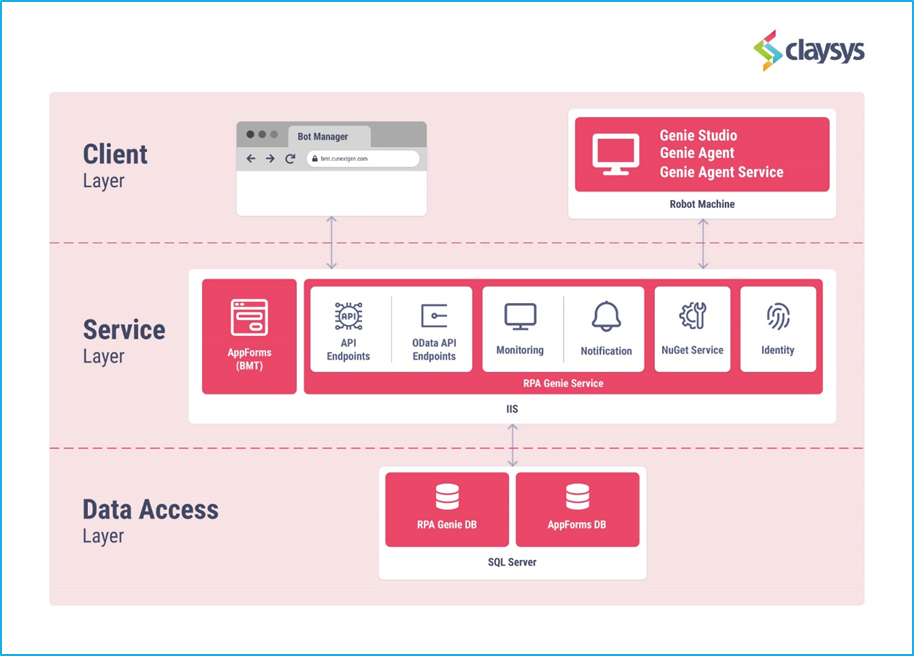
The Build 8 of RPA Genie has been released on 13 May 2024. This release notes lists out all the additional features, fixes and improvements that have been made to RPA Genie when compared to Build 7.x.x. The first version of RPA Genie is 8.1.0.0 and the final version is 8.6.0.0. Below you will find the comprehensive details about the features and updates for different versions of Build 8. Our relentless efforts are directed at enhancing its capabilities to deliver the best possible automation experience, exceeding expectations and enabling our users to reach new levels of productivity and efficiency.
RPA Genie Release Update (Version 8.1.0.0)
Release Date: May 13, 2024
Features
- Chrome Extension: RPA Genie can use this extension to work coherently with the normal Chrome browser to enable smooth detection of UI elements and provide users with opportunities for seamless development of web-based automation using RPA Genie Studio.
- Note: A few users are experiencing an issue where the Chrome extension rarely disables itself, which may affect the running automation that uses it. Our team is actively working on a fix. However, automations using Genie Chrome are functioning without any issues.
- Java Extension: RPA Genie can use this extension to work coherently with Java-supported sites to enable smooth detection of UI elements and provide users with opportunities for seamless development of web-based automation using RPA Genie Studio.
- Genie File System in Project: Enables Genie Studio to use a File system for storing and managing project development. In other words, a user will be allowed to create a project in the local file directory based on the versioning tool he/she chooses. Currently, there are 2 versioning tools: –
- Genie TFS for creating a project in the DB.
- File-System for creating a project in the local File Directory.
- Conditional Breakpoint: The execution of the workflow will pause if the condition provided by the user in the conditional breakpoint is satisfied.
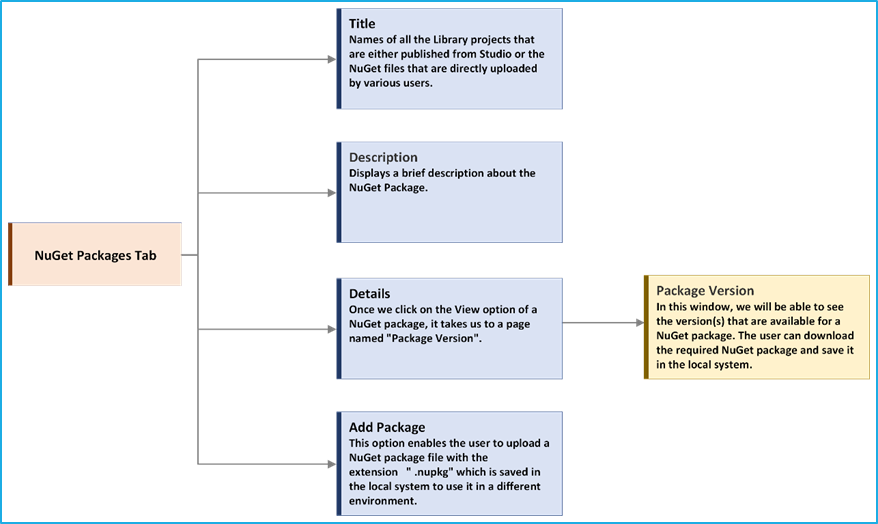
- NuGet Package Manager: It allows the users to load a package source from ‘nuget.config’ where the user will be able to add, delete, update and create default package source.
- Advanced Project Publish: Allows the user to publish the package independent of projects by selecting the available packages in the Bot manager or the user can publish the package with a new name.
- Project Snapshot: It enables the user to capture the source code and the history of the project and is used while creating a new project to obtain a copy of snap projects.
- Activity Tray in RPA Genie Studio: Activity tray allows the user to start, pause or stop the process from the tray. The user will be able to visualize which activity is being executed currently in the form of a small pop-up window at the bottom of the screen.
- New Activities in RPA Genie Studio:
- Extract Data Table V2: Added remove an empty row, make the first row a header and save options.
- New window – tab and window: Using this activity, the user can either open a new tab in the existing window or open a new window.
- Move Window: This activity will change the position and dimensions of the indicated window.
- Get window position: Retrieves the bounding rectangle of a specified UI element
- Row Exists: This activity will allow verifying the existence of a specific row in the tabled data structure while executing the automation processes.
- Column Exists: This activity will allow verifying the existence of specific column in the tabled data structure while executing the automation processes.
- Open UserBrowser: This activity will be available in the studio after installing the Chrome extension. ‘Open UserBrowser’ is used to directly open the Chrome and get the browser window with selectors. It also functions as a get window. If we have an existing window open in the background, then we can use it by enabling “Attach existing window” property.
New Enhancements – RPA Genie Studio
- Lazy loading for variable and argument Expression Editors during the sequence opening process.
- The Variables/Arguments value field can be edited only by double clicking on it and the field will be locked upon clicking elsewhere.
- Listing Frequently used activities
- While hovering over the “+” sign between two activities in the designer panel, shows a list of frequently used activities for convenience. Users can then select the desired activity from the list to incorporate it into the project.
- Image optimization settings
- In this version of Studio, you can set the image display size by specifying the height and width, which will determine how the UI activity images are displayed in a compressed size.
All new – RPA Genie Co-Pilot
- This is the version 2 of RPA Genie Co-pilot.
- Effortlessly navigate and control processes through the favorites window.
- Via the settings tab, users can manage themes, shortcuts, zoom levels and more.
- Users can access our Genie Extensions through the Extension Manager tab.
- In the About section, users can easily visualize details about their robot and machine configurations.
- Users can effortlessly filter their processes through the sorting feature.
- Receive ‘Take Online’ notification upon service restoration.
New Enhancements – Bot Manager
- Item Tagging
- “Tags” are used to control access centrally to organize, track usage and manage access to various items in BOT Manager. The administrator can tag related items and other users can view them by filtering each section.
- Keep RDP session Alive
- The ‘Keep RDP Session Alive’ property helps to keep the robot sessions in connected state, preventing the robot from being logged off when no jobs are present. This is particularly useful for short-duration RDP creations, as it reduces the load on the system and improves performance.
- When the ‘Keep RDP Session Alive’ feature is disabled, the session will be logged off after the job is finished, and the robot state will remain active.
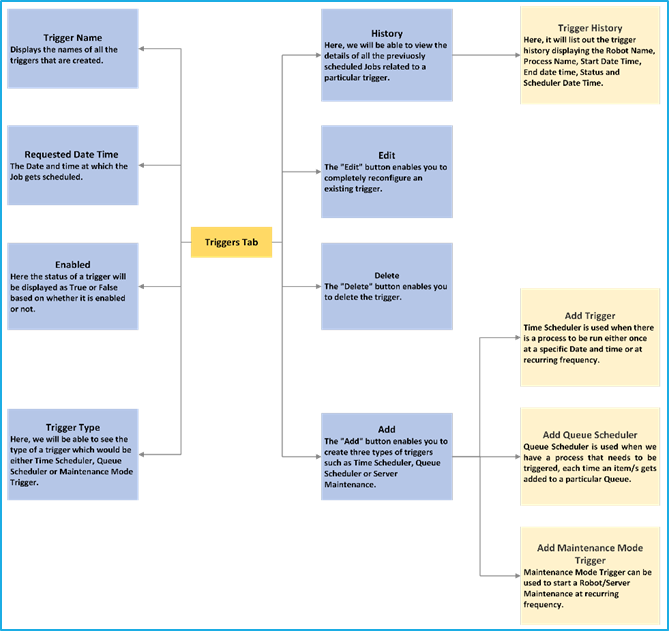
- ‘Refresh last schedule datetime’ check box in Time scheduler and Maintenance mode trigger
- ‘Refresh last schedule datetime’ in Time scheduler and Maintenance mode trigger to update the last schedule column field as null to run the trigger again. This help to tackle the trigger behavior according to the user need.
- BMT Queues Dashboard Enhancement
- With the new hamburger button all the actions like view, edit, and delete are accessible under one click.
- The Queue dashboard now includes an extra column named ‘Error,’ presenting the count of errors associated with the respective queue.
- With the addition of three distinct columns “In Progress”,” Pending” and “Error”, it is easy to keep track of the transactions, eliminating the need to navigate to specific queues to monitor the status of individual items.
- Delete Queue Item – Allows the user to delete the Queue item directly from the BMT
- BMT Job Dashboard enhancement
- The filter results and the condition persist unchanged even after navigating to a different area and returns back.
- The Retry option is disabled for completed and new queue items.
- Trigger update on trigger execution
- Skipping the first instance of creating and updating a time scheduler issue is fixed.
- For standardizing Special character Entry is Restricted in Queues and Resources
- Can create Queue with characters only support _ as special character, this change will not affect the existing Queues with special characters.
- Resource can be created with characters, only support _ as special character, when editing the resource, it will support all the special characters.
New Enhancements – RPA Genie Service
- Import-Export Update with Service Audit
- When a new item (Process, Queue, Resource, NuGet, etc.) is added or modified from Import-Export, details such as the item type, name, and the user that uploaded the file can be viewed from the service audit and the specifications about the file uploaded can be seen from the view tray to the right of it.
- Synchronize API to Process Queue Item
- Users can now process the queue using available robots and retrieve transaction information once the transaction is processed.
- Inbuild Health Monitoring
- Server Agent monitoring will monitor the SQL and the API connectivity on server machines.
- Agent Service monitoring will monitor the API connectivity on Robot machines.
All New – NuGet Packages
- File Extension
- By using the File Extensions activities, the user will be able to convert a file to byteArray, base64 string and convert byteArray, base64 string to a file.
- DataTable Extension
- Single platform for data-table operations. Added a new activity called ‘DeleteDuplicateRow’ for deleting the duplicate rows from the DataTable.
- Pdf Activities
- Added a new activity called Pdf protect in which the user can restrict future modifications.
- Excel Extension.
- Added a new activity “Copy Sheet” that duplicates the current sheet with the given name.
- IIS Activities
- By using the IIS Activity, the user will get the details about IIS websites.
- Task Scheduler Activities
- By using the Task scheduler NuGet, the user will be able to add the task into the task scheduler and also fetch the details of the task from the task scheduler.
- Cryptography Activities
- By using the Cryptography activities, the user can encrypt information or data into a code and also helps to decrypt a text.
- Teams Activities
- This NuGet package enables users to send messages to a Teams channel using a webhook URL.
- Impersonation Activities
- With this NuGet package, a user can open an application or process as a different user.
All New – Admin Console
- RPA.Genie.Adminstrative.Tool Enhancement
- This allows the admin to change the logging level and crypto service to encrypt and decrypt the items in RPA Genie Service.
Other Enhancement – Migration
- RPA Genie leverages have been migrated from .NET Framework 4.6.1 to .NET 6 core for enhanced performance and improved efficiency.
- Note: This update includes significant changes. Before deployment in production environments, we recommend that it’s essential to thoroughly review and test the Execute PowerShell activity to ensure compatibility with existing workflows.
Deprecated Items
- RPA Genie Agent
- Robot Alerts for Unattended Automation
- Health Monitor, Data Retention as separate EXE
- PowerShell activity with PowerShell script version 5.
- Index option in switch tab activity
RPA Genie Release Update (Version 8.1.3.0)
Release Date: July 23, 2024
Top Fixes and Improvements
- Fixed: The issue where the “Open Browser” activity would fail during automation via Genie Chrome when the Chrome extension was enabled has been fixed. Previously, users had to manually disable and re-enable the Chrome extension to ensure smooth execution of Genie Chrome automation.
- Fixed: The issue where queue items remained in the “In Progress” state for more than 24 hours without transitioning to the “Abandoned” state has been fixed.
- Fixed: Enhancements made in the script to support SQL server 2016 and above.
- Fixed: Issue in listing SSL Certificate during the service Installation.
- Fixed: Unable to start the Job from BMT with registered BOT when the robot status is active- and no robot session.
- Fixed: Open UserBrowser activity listed in Background process.
- Fixed: Enhancement of the working of Recurring hourly trigger.
RPA Genie Release Update (Version 8.2.2.0)
Release Date: September 06, 2024
Features
- Virtual Desktop Bot (Picture-in-Picture)
- The Virtual Desktop Bot feature of RPA Genie enhances the user experience of executing attended automation in a distinct desktop session while concurrently interacting with desktop applications in the primary environment.
- Bot Manager Mailer activity
- This activity will send SMTP mail from the robot or the server
- Permission set for Robots in Bot Manager
- This feature will help to manage the Bots based on the given set of permissions.
- Activity Search Engine in studio
- This feature enables the users to search by activity name to identify the ‘Activities’ used within the project.
- Please note: Search functionality will be further optimized and refined in upcoming versions.
Other Enhancement – Genie .Net 8 Migration
- RPA Genie service, studio, and Appforms Extension has been migrated from .NET 6 to .NET 8. This migration brings enhanced performance and improved security.
Top Fixes and Improvements
- Improved: When a sequence is checked in frequently used activities on hover is disabled
- Improved: Permission set fixes in BMT security
- Improved: Enhancement in Kill Process activity.
- Improved: BMT SMTP Server setting modification
- Improved: Download logs enhancement- Now a standard user can also download the logs from BMT.
- Fixed: Data Redundancy Error In Robot Transaction.
- Fixed: View button alignment breaking when we update the status with a long content reason with HTML format.
- Fixed: Get Queue Item Details Get Deadlock if executed in more than one instance.
- Fixed: Priority not considered while prevent parallel job checked in Time Trigger
- Fixed: SMTP SSL validation as an Option in AppSettings.json
- Fixed: Unable to load image from Genie file explorer
- Fixed: Restore issue in holiday calendar without description
- Fixed: Release note not reflecting after restoring process using import-export.
- Fixed: Is editable issue in restoring resources using import-export.
- Fixed: Ui Explorer crashes when load children is used.
- Fixed: Unable to restore Nuget packages using import-export.
- Fixed: Default Nuget url in Nuget packages not updated.
- Fixed: Nuget Manager crashes when an invalid URL is provided.
- Fixed: XML scroll issue fixed
- Fixed: Deleted process reappearing after build upgrade.
Deprecated Items
- Interval time in robot alerts in BMT (Robot alerts work for attended automation only, so to notify that added note in the BMT.
RPA Genie Release Update (Version 8.2.3.0)
Release Date: September 26, 2024
Top Fixes and Improvements
- Fixed: NuGet script was not getting created during the execution of the NuGet service.
RPA Genie Release Update (Version 8.2.4.0)
Release Date: October 25, 2024
New Feature
- Custom RDP port: This feature enables the user to specify a custom RDP port number for unattended automation.
RPA Genie Release Update (Version 8.2.8.0)
Release Date: January 06, 2025
New Feature
- Java Extension: The following activities will appear in Studio under Java Application after installing the Java Extension:
- Get Selected Item: This activity returns the details of the selected item’s AccessibleContextNode object, including its name, role, X-axis, Y-axis, height, and width.
- Get Supported Actions: This activity returns a collection of actions supported by the Java selector.
- Get Table Cell Details: This activity returns the details of a specific table cell based on the Java selector, along with the row index and column index.
- Get Table Details: This activity returns the details of the table associated with the Java table selector.
- Perform Action: This activity performs the actions supported by the Java selector.
- Select Item: This activity selects an item based on the name and index of the Java selector.
- Toggle Element: This activity performs the toggle action supported by the Java selector.
Top Fixes and Improvements
- Improved: Code-level improvements for a more controlled and smoother robot shutdown.
RPA Genie Release Update (Version 8.2.9.0)
Release Date: March 27, 2025
Top Fixes and Improvements
- Fixed: Save issue in Resource module of BMT
- Fixed: Save issue in Process module of BMT.
- Fixed: Items per page in BMT getting changed after refreshing.
- Improved: Display of resource names in the search filter dropdown.
- Fixed: BotManagerMailer activity fails to send emails when only the “To” field is configured.
RPA Genie Release Update (Version 8.3.1.0)
Release Date: May 12, 2025
New Enhancements – Bot Manager
- SMTP Azure OAuth Authentication and selecting SMTP Authentication: Added support for SMTP Azure OAuth authentication and the ability for users to select the authentication type for SMTP settings.
New Enhancements – RPA Genie Studio
- Bot Manager Mailer activity V2: This activity now supports sending SMTP emails from the robot or server using Azure OAuth authentication.
- Send STMP Mail Message activity V2: This activity now supports sending SMTP emails using Azure OAuth authentication. Users can also configure the activity by selecting the authentication provider (Azure OAuth, Basic Auth, or Anonymous).
RPA Genie Release Update (Version 8.6.0.0)
Release Date: January 05, 2026
Top Fixes and Improvements
- Fixed: PowerShell execution on Windows 11 machines.
- Fixed: Edge driver auto-download URL issue following changes to the Microsoft Edge driver path.
- Fixed: Queue trigger priority execution issue.
- Improved: Redis cache handling between the load balanced services.
- Improved: Connection stability between Agent Service and Genie Service using a retry initializer.
- Improved: Database Input/Output memory utilization.
- Improved: RDP handling for unattended automation
- Improved: RDP session when the Keep Session Alive option is enabled.